
The watch's minus button sometimes added a point — fixed
The minus button on the Apple Watch could add a point instead of taking one off. You give a point to the wrong side, tap minus to correct it, and the score goes up. Tap a few more times and the score is completely wrong. A player on 26.3 wrote in with exactly that, and we could reproduce it. badmintho 26.4 fixes it. This post explains what went wrong and what changed.
What went wrong
There were two causes, and either one could spoil a correction.
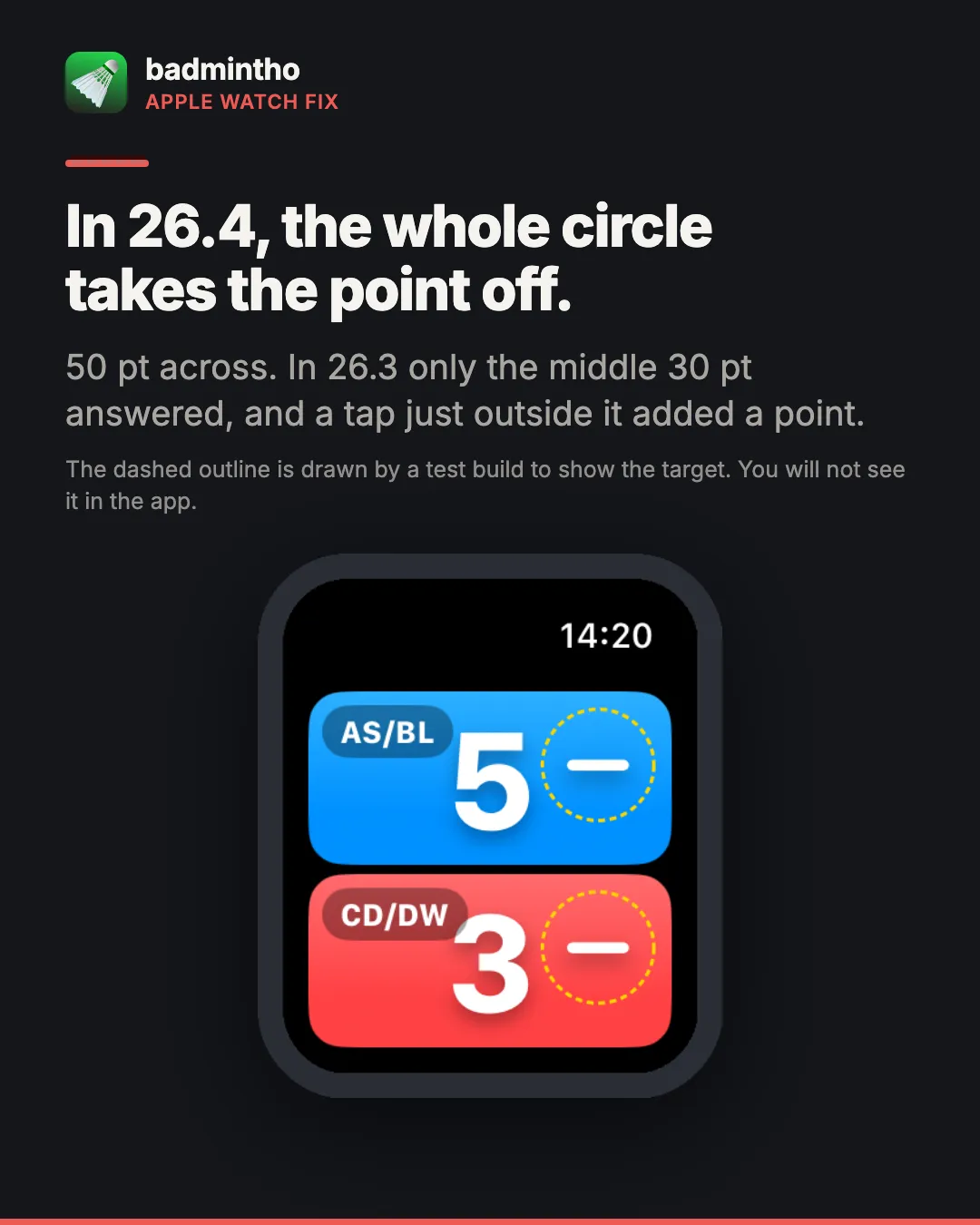
The minus button was smaller than it looked. Up to 26.3 the button only responded to taps inside a circle 30 points across, and it sat almost on the edge of the score button. A tap more than 15 points from the middle of the minus sign, which is easy on a moving wrist, missed it and landed on the score button underneath. That counts as a point for that side. So the correction added a point, and each further try added another.
The phone could undo a correction. When the iPhone was keeping the same match, the watch sent the phone its whole scoreboard rather than the button press. If the phone was busy at that moment, for example with a point scored on it or a game ending, it could ignore the watch’s version and send its own older score back to the wrist. The correction then disappeared.
What 26.4 changes
The whole circle takes the point off. The minus button now responds anywhere in a circle 50 points across, which is larger than Apple’s minimum touch target on the watch. The circle sits fully on the score button, so a tap near the edge no longer falls through. We compared sizes on a 40 mm watch. Anything larger than 50 began to cover the right side of a two-digit score, where a tap meant as a point would become a correction.
The watch sends the press, not the board. A minus on the wrist now reaches the phone as “take one point off blue”. The phone applies it to its own score, so a busy phone can no longer throw the correction away. Until the phone confirms it has the press, the watch keeps showing your correction instead of an older score. A press made while the connection is down is sent when it comes back, and is counted only once.
Tested on the watch it was reported on
The report came from an Apple Watch SE 3, 40 mm, one of the smallest Apple Watch screens. We wrote automated tests that tap the watch the way a finger does, on that model. One taps 14 to 20 points from the middle of each minus sign, the off-centre taps that added a point on 26.3, and checks that every one removes exactly one point. Others press minus repeatedly down to zero, alternate quickly between plus and minus, and do the same with the sides mirrored.
That is one of those tests running against 26.4: every tap around the minus takes blue from 5 to 4, and a tap on the score puts it back. A second set of tests runs a correction from the watch to a paired iPhone simulator, with the phone app open, in the background, and closed.
Until 26.4 reaches you
If you are still on 26.3:
- Tap the minus sign itself, right in the middle, not near it.
- Or correct the score on the iPhone when it is keeping the same match. The phone’s minus button is much bigger and is not affected.
- If the score is already wrong, tap the middle of the minus sign until it is right again, and check the score after each tap.
Updates install automatically from the App Store if you have that turned on. Otherwise open the App Store, tap your profile picture and update badmintho there.
Thank you to everyone who wrote in, especially the player who included the badmintho, iOS and watch versions. That made it much quicker to find. If something still does not behave as you expect, let us know.
More
- badmintho scoring rules — how a rally, a game and a match are scored
- badmintho FAQ — Apple Watch, jumps and match history
- badmintho support — if something here does not match what you are seeing